Apple Health & Health Connect for personal trainers: sleep, heart rate, steps without asking a thing.
Your clients connect Apple Health (iOS) or Health Connect (Android) in one tap. You see their sleep, steps, heart rate and cardio activity data straight from their client profile, no form, no manual entry. +3 500 trainers already use it.
Compatible with Apple Health (iOS) and Health Connect (Android) · Included in the Fit'Distance coaching software

The Health data module in action.
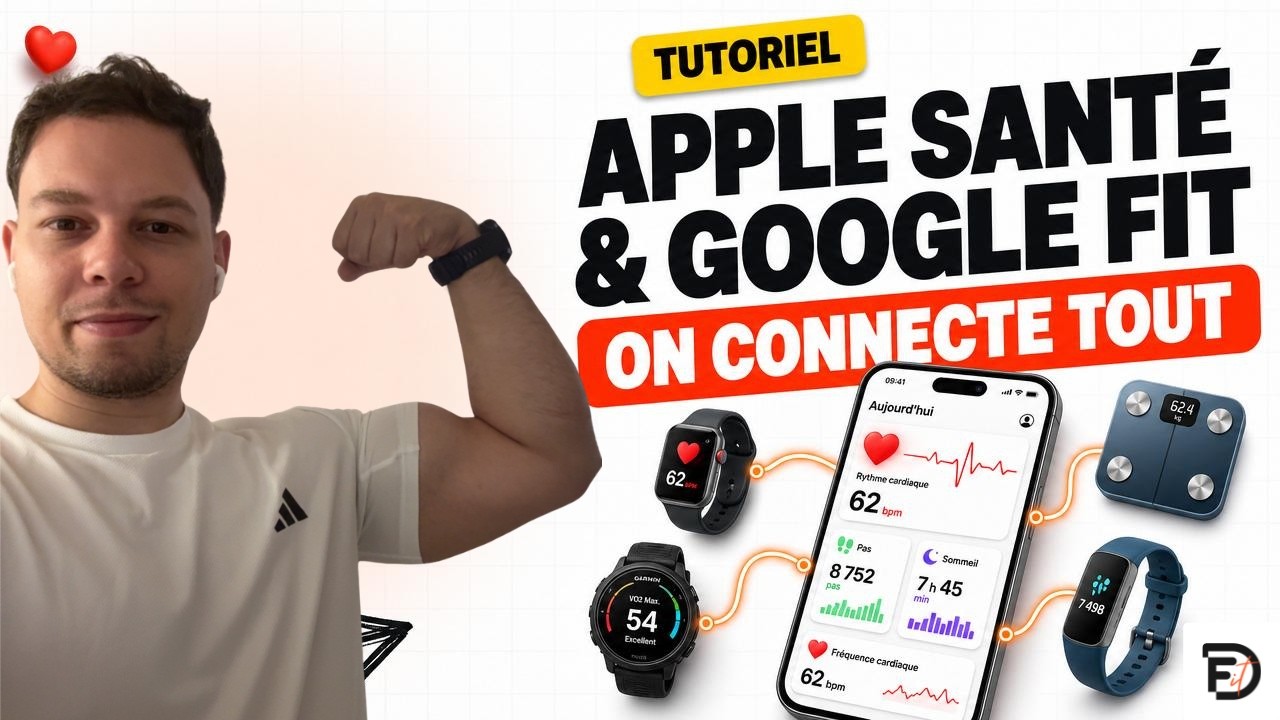
Compatible with what your clients already own.
Apple Health and Google Health Connect already aggregate every brand. We read these native hubs, so everything follows: no integration to activate device by device!






…and anything that talks to either of these two hubs.
No more asking "did you sleep well?" every session.
You get the real numbers, in near real time, with no form to fill out. Your clients stay in control of what they share. You gain context no one could ever give you out loud.
One-tap connection
The client turns on Apple Health or Health Connect from the app. No setup on the coach side, no scale or watch to buy. They already have what they need in their pocket.
Per-client trends
No spreadsheet to build: each metric has its own trend chart over 7, 30 or 90 days, right inside the client profile. You spot the breaks without searching.

Secure. Read-only.
Fit'Distance never touches the phone's data. We read what the client already has, we change nothing. The client can cut off sharing at any time from their settings.
6 health metrics. None to ask out loud.
We sync the data that actually changes your coaching decisions. Every field comes from the same source: the health app on the client's phone. No manual entry, no extra questionnaire.
Steps
Daily activity volume. The first signal of a change in routine: stressful job, injury, motivation crash.

Sleep
Total duration and efficiency. The #1 lever to explain a bad session or a plateau. Stop asking, just read.
Heart rate
Resting HR + daily average. A resting HR creeping up over 7 days = overtraining, fatigue, stress. You see it before they feel it.

Active calories
Energy spent on activity, excluding basal metabolism. To calibrate nutrition intake against what the client actually burns.
Weight & body fat
If the client has a connected scale (Withings, Renpho…), we pull weight and body fat %. Kept separate from manual check-ins. No mixing.
Cardio activities
Running, cycling, swimming, yoga, walking. Type, duration, distance, average and max HR, calories. With the source (Apple Watch, Strava, Garmin via Health Connect…).
A summary tile on every client profile.
On each client's main wall, a card summarizes their week. In 3 seconds you decide whether to call them, tweak the program, or leave them alone.
- "Health" tab in the wall, next to Check-ins and Forms.
- Summary tile on the wall: weekly steps, average sleep, cardio activities, resting HR.
- Full-screen detail with 7 / 30 / 90 day chart, average, min, max, source.
- List of the week's cardio activities: type, duration, distance, source.
Three screens. Zero friction.
The client sees a new "Health" tab in their app. They pick what they share, approve the system permissions, and that's it. No recurring action: sync runs automatically as long as the connection stays active.
The client turns on the connection
New "Health" tab in their app. A screen explains what will be shared with their coach. "Connect Apple Health" or "Connect Health Connect" button.
Apple or Google asks for consent
iOS or Android system sheet: the client ticks each metric they agree to share, one by one. They can tick all, none, or pick and choose.
Sync runs on its own
The app pulls the last 30 days of history on the first sync, then refreshes every time the app is opened. The client gets their own health dashboard inside Fit'Distance.
They stay in control, always
"Disconnect Apple Health" button in their settings. Stops sharing immediately. You still see past history, but nothing new comes in.
From connection to decision in 3 steps.
You see who's connected
On each client's wall, a status shows whether the connection is active. If the client hasn't opted in, you see an explicit card, no data. No surprises, no guessing.
You scan the summary tile
Weekly steps, average sleep, resting HR, number of cardio activities. In 3 seconds, you know if the client's week was normal or if something shifted.
You click into the detail if needed
Full-screen Health tab, 7 / 30 / 90 day charts per metric, list of cardio activities. You decide: adjust the volume, space out a session, or simply note that everything's fine.
The client stays in control. Always.
This section deals with sensitive data. We designed it with a simple principle: the client is the only decision-maker, and you only see what they let you see.
- Explicit consent on the client side, opt-in
- Read-only. No writes to Apple Health or Health Connect
- Disable at any time from their settings
- Data hosted in the EU, GDPR-compliant
Modules that complete connected health.
The questions we get asked the most.
What health data can a coach track?
From the client's profile, the coach sees steps, active calories, sleep, heart rate (including resting), weight and cardio sessions. Steps and calories work with the phone alone; sleep and heart rate require a device that measures them (Apple Watch, Garmin, Whoop, Oura…).
Which wearables and apps is Fit'Distance compatible with?
Fit'Distance reads data through Apple Health (iOS) and Health Connect (Android). Any device or app that connects to one of these two hubs syncs automatically: Apple Watch, Garmin, Fitbit, Whoop, Oura, Polar, Withings, Strava, Renpho and most connected watches and scales. No per-device integration to set up.
What's the difference between Apple Health and Health Connect?
Apple Health is the iPhone's health-data hub (iOS); Health Connect is its Android (Google) equivalent. Both aggregate data from the user's watches, bands and apps in one place. Fit'Distance reads whichever one your client uses. Nothing to choose, it follows their phone.
Do my clients need a smartwatch?
No. The phone alone is enough for steps and active calories. For sleep and heart rate, you need a device that measures them: Apple Watch, Fitbit, a Garmin watch connected to Health Connect, an Oura ring, or any tracker compatible with Apple Health / Health Connect. If the client doesn't have one, you just see the steps. The other fields stay empty, with no crash.
Will my clients agree to share this data?
Sharing is strictly opt-in. On Apple's or Google's system screen, the client picks exactly which metrics they let you see. They can cut it all off with a single button in their settings, at any time. Our job is to show them the added value, for them, not just for you: better program adjustments, fewer repetitive questions in every check-in.
Do you write anything to Apple Health or Health Connect?
Never. It's one of our founding rules: Fit'Distance reads the data, doesn't modify it and doesn't add to it. The client's phone stays their property, their logbook. We observe it, we don't write to it.
What if the client wants to stop sharing?
There's a "Disconnect Apple Health" (or Health Connect) button in their Fit'Distance settings. One tap, and the sync is cut off. Past data stays visible on the coach side, but nothing new comes in. If they also want to delete past history, they contact support.
Does it work on web or only on the mobile app?
The sync runs from the client's mobile app (that's what talks to Apple Health / Health Connect). On the coach side, you see the data on both web and mobile. The client profile is the same everywhere. If one of your clients uses Fit'Distance on web only, they'll see a screen inviting them to install the app to turn on the health connection.
How do I turn it on for my clients?
It's already active on your account, nothing to turn on on the coach side. On the client side, they open the Fit'Distance app and find access either in the left menu or directly from the home screen. One tap to authorize Apple Health or Health Connect, and the first data points come in within a minute. The 30-day history is pulled automatically.
No more asking. Just read.
Create your account for free and invite your clients to connect Apple Health or Health Connect in one tap.